


What is a Steam Gift Card or Wallet Code?
A Steam gift card or wallet code is a digital or physical voucher that adds funds to your Steam account.
You can use it to:
Buy games
Purchase in-game items
Unlock additional content
To redeem your gift card on Steam, follow these steps:
Download and install the Steam app from this link.
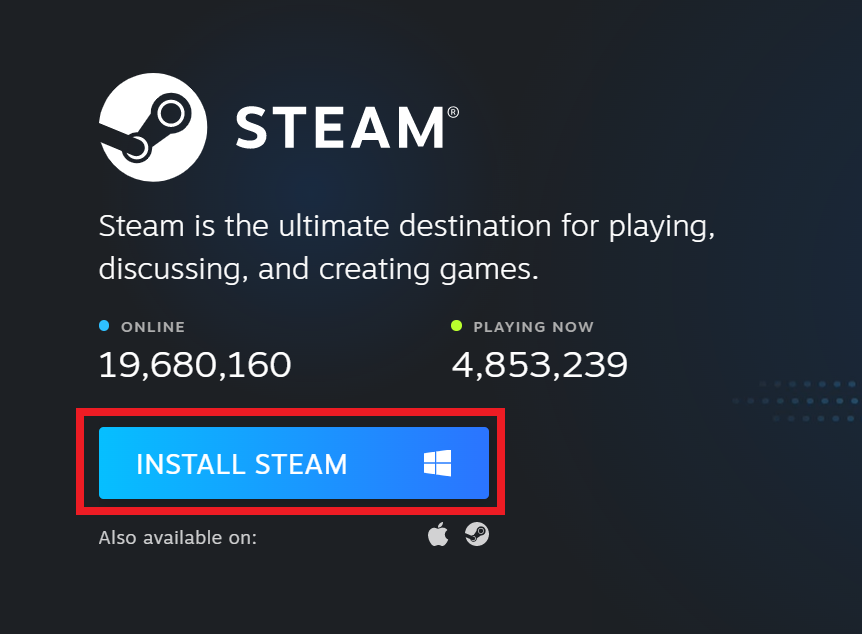
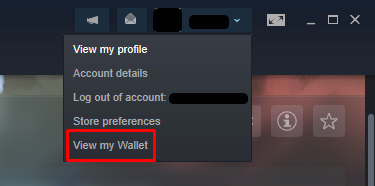
Once the app is installed and opened, log in with your Steam credentials, then select View my wallet from the drop-down menu, as shown in the image below.
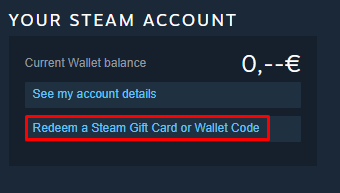
When you arrive at the Wallet page, click on Redeem a Steam Gift Card or Wallet Code.
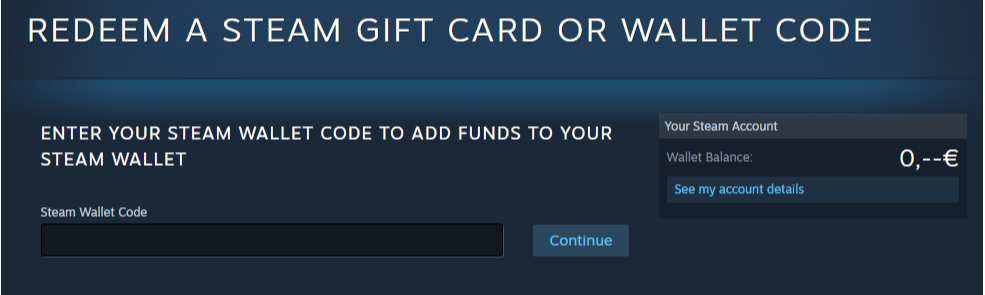
Paste your activation code into the Steam Wallet Code field and then click Continue.
Discover awesome Steam gift card deals on Nexuscod.
Common Issues with Steam Codes
Code already used
Invalid code
Region mismatch
Expired code
💡 Tip: Always verify your Steam code and region before redeeming.
FAQs
❓ How fast is a Steam gift card or wallet code redeemed?
➡️ Instantly after entering the code
❓ Can a Steam code be used twice?
➡️ No, each code is valid for one-time use only
❓ Is it safe to buy Steam codes online?
➡️ Yes, especially from trusted platforms like Getacodes
🧠 Pro Tip
Always redeem Steam gift cards or wallet codes from trusted sources to get funds safely and instantly.